AI Image Generators: How They Work, Best Uses, Benefits, and Tips
AI image generators have changed the way people create digital visuals. In the past, making a professional image often required graphic design skills, expensive software, or hours of manual editing. Today, an AI image generator can turn a simple text description into an image within seconds.
From social media creators and bloggers to businesses, students, artists, and marketers, many people use AI image tools to produce visual content faster. These tools can create illustrations, realistic scenes, product concepts, characters, backgrounds, posters, and many other types of images.
But what exactly are AI image generators, and how do they work? More importantly, how can you use them effectively?
This guide explains the technology, common uses, benefits, limitations, and practical tips for creating better AI generated images.
What Is an AI Image Generator?
An AI image generator is a software tool that uses artificial intelligence to create pictures based on instructions provided by a user.
Most tools allow you to enter a text prompt describing what you want to see. The system then processes the words and produces an image that matches the requested description as closely as possible.
For example, you could enter:
“A small orange cat sitting beside a rainy window in a cozy wooden room, cinematic lighting, detailed digital art.”
The AI can interpret these instructions and generate a visual scene based on them.
Some platforms also allow users to upload an existing picture and modify it. Depending on the tool, you may be able to change backgrounds, add objects, remove unwanted elements, adjust styles, or expand an image beyond its original borders.
How Do AI Image Generators Work?
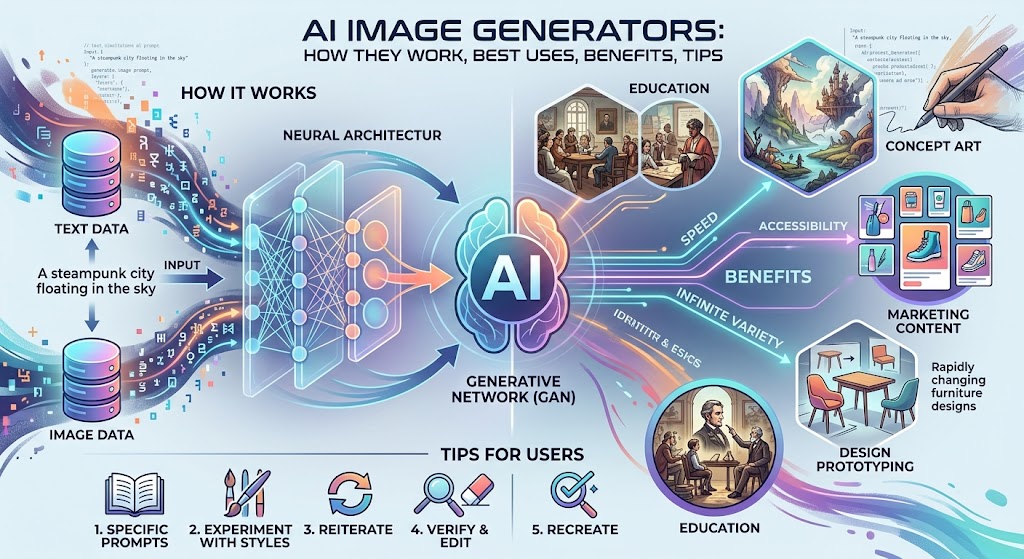
AI image generators rely on machine learning models trained using large collections of visual data. During training, the system learns relationships between images and the descriptions or concepts associated with them.
When you enter a prompt, the model analyzes the words and converts the information into a representation that can guide image creation.
Modern image generation systems can understand many different elements, including:
- Objects
- People
- Locations
- Colors
- Lighting
- Art styles
- Camera angles
- Composition
- Clothing
- Atmosphere
- Visual effects
The generator combines these concepts to produce a new image.
The exact technology varies between platforms. Many modern systems use diffusion based methods, while other approaches and model architectures are also used across the industry.
Why Are AI Image Generators So Popular?
The biggest reason for their popularity is convenience.
Creating a custom image traditionally required either drawing skills, photography equipment, stock images, or professional design software. AI can reduce the amount of manual work required.
A blogger might need a featured image for an article. A YouTube creator may need a thumbnail concept. A small business could need a product advertisement. Instead of starting from a blank canvas, users can describe their idea and generate an initial visual.
AI image generators are also useful for experimentation. You can create several versions of an idea and decide which direction works best.
Common Uses of AI Image Generators
1. Blog Images
Website owners can create original illustrations for blog posts, tutorials, guides, and informational pages.
A relevant image can make an article more visually appealing and help break up large sections of text.
However, images should support the content rather than simply being added for SEO purposes.
2. Social Media Content
Social media creators constantly need fresh visual content. AI can help generate backgrounds, illustrations, promotional graphics, and creative concepts.
For example, a creator running a food page could generate colorful illustrations of recipes or food related themes.
3. YouTube Thumbnails
A strong thumbnail can help communicate the topic of a video quickly.
AI image generators can create background scenes, characters, objects, and visual concepts that creators can later combine with text using an image editor.
4. Marketing
Businesses can use AI generated visuals for brainstorming advertising concepts, campaign ideas, product presentations, and social media posts.
For professional campaigns, businesses should still review generated images carefully before publishing them.
5. Product Concepts
AI can help visualize ideas before a physical product exists.
A designer might describe a futuristic backpack, modern chair, smartphone concept, or piece of clothing and generate several visual directions.
These images can be useful during the early planning stage.
6. Character Design
Writers, game developers, animation creators, and content creators can use AI to explore character ideas.
A prompt can describe a character’s age, clothing, environment, personality, and visual style.
Multiple generations can then be used to explore different concepts.
7. Education
Teachers and students can use generated images to create visual learning materials.
For example, an educator could generate an illustration showing a historical setting, science concept, geographic environment, or fictional story scene.
What Makes a Good AI Image Prompt?
The quality of an AI generated image often depends on how clearly the request is written.
A vague prompt such as:
“A beautiful house”
gives the system relatively little information.
A more detailed prompt could be:
“A modern glass house beside a calm lake, surrounded by pine trees, early morning fog, warm interior lights, realistic architectural photography, wide angle composition.”
The second prompt provides information about the subject, environment, lighting, style, and composition.
Important Prompt Elements
When writing prompts, consider including:
Subject: What should appear in the image?
Environment: Where is the subject located?
Style: Should it look realistic, illustrated, cinematic, cartoon based, or artistic?
Lighting: Do you want sunlight, studio lighting, soft light, dramatic shadows, or nighttime lighting?
Composition: Should the image be a close up, portrait, wide shot, overhead view, or another composition?
Mood: Should the scene feel peaceful, exciting, mysterious, cheerful, or professional?
The more relevant details you provide, the easier it becomes to communicate your visual idea.
AI Image Generators for Different Creative Needs
Different users need different types of image generation.
Someone creating social media posts may prefer a simple interface with quick results. A professional designer may need advanced controls and image editing features.
Some tools focus on realistic images, while others are particularly useful for illustrations, concept art, graphic design, or experimental visuals.
Before choosing a platform, consider what you actually need rather than selecting a tool simply because it is popular.
Benefits of AI Image Generators
Faster Content Creation
AI can create an initial visual concept much faster than traditional manual design.
Easy for Beginners
Many tools do not require advanced artistic skills. A user can start with natural language prompts.
Creative Experimentation
You can test different concepts without creating every version manually.
Useful for Small Businesses
Small businesses with limited design resources can use AI for early visual concepts and simple content.
Flexible Styles
One idea can often be transformed into different visual styles, allowing creators to explore multiple directions.
Limitations of AI Image Generators
AI image generation is powerful, but it is not perfect.
Generated images can contain unexpected details, especially when prompts involve complicated scenes.
Common problems may include:
- Incorrect text
- Strange object shapes
- Inconsistent characters
- Unusual hands or fingers
- Incorrect proportions
- Missing objects
- Unwanted background details
- Inconsistent visual style
For this reason, generated images should be reviewed before publication.
Are AI Generated Images Copyright Free?
This is an important question.
The answer is not simply yes or no.
Copyright rules for AI generated content can differ between countries and may depend on the level of human creativity involved in creating or modifying the work.
There can also be separate issues involving the terms of service of the AI platform and the material used to create prompts or reference images.
If you are using AI images commercially, check the current terms of the specific AI service and the copyright rules applicable in your country.
Do not assume that every image generated by an AI tool automatically has unrestricted commercial rights.
How to Create Better AI Images
Start with a clear idea before writing your prompt.
Instead of trying to describe everything at once, identify the main subject and then add the most important visual details.
For example:
Basic prompt:
“A dog in a city.”
Improved prompt:
“A golden retriever sitting on a quiet city street after rain, reflections on the pavement, soft evening lights, realistic photography, shallow depth of field.”
The second version gives the generator much more useful information.
You can also generate several variations instead of expecting the first result to be perfect.
AI Image Generators and SEO
AI generated images can support an SEO strategy, but simply generating an image does not guarantee higher Google rankings.
Search engines evaluate many signals when determining how useful a webpage is to users.
For website owners, the most important approach is to create genuinely useful content and use images where they add value.
If you publish AI generated images, consider using descriptive file names and appropriate alternative text. Compress large images so they do not unnecessarily slow down the website.
For example, instead of a generic file name such as:
image123.jpg
a descriptive file name might be:
ai-generated-modern-office-design.jpg
The image should also match the subject of the page.
Tips for Responsible AI Image Creation
AI tools should be used responsibly.
Avoid creating misleading images that could cause people to believe a fictional event actually happened. Be especially careful with images involving real people, sensitive events, or deceptive contexts.
Creators should also respect intellectual property and platform rules.
If you use reference images, make sure you have appropriate permission to use them.
The Future of AI Image Generation
AI image technology continues to develop quickly.
Future tools are likely to offer better control over characters, objects, text, lighting, composition, and image editing. Users may also be able to make detailed changes without regenerating an entire picture.
The technology is becoming useful across many creative industries, including advertising, entertainment, education, publishing, product design, and social media.
At the same time, questions about copyright, ownership, authenticity, and responsible use will remain important.
Final Thoughts
AI image generators have made visual creation more accessible to people who may not have traditional design skills. A simple description can become a detailed visual concept in a short amount of time.
The best results usually come from treating AI as a creative tool rather than expecting it to produce a perfect image automatically. Clear prompts, multiple variations, careful editing, and human review can make a significant difference.
Whether you are a blogger, YouTube creator, designer, marketer, student, or business owner, AI image generation can give you a practical way to explore visual ideas and produce original content more efficiently.
The key is to use the technology thoughtfully, check the rights associated with your chosen platform, and make sure every image genuinely supports the content around it.
About the Author