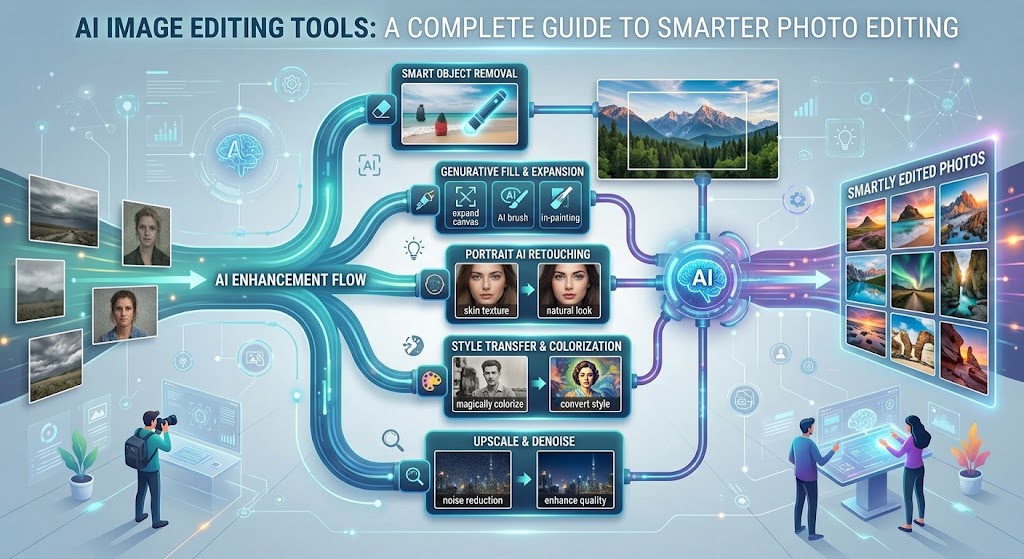
AI Image Editing Tools: A Complete Guide to Smarter Photo Editing
Image editing has changed significantly in recent years. Tasks that once required advanced software skills can now be completed with the help of artificial intelligence. From removing unwanted objects to changing backgrounds and improving image quality, AI image editing tools can make many creative tasks faster and easier.
These tools are useful for beginners, photographers, bloggers, marketers, social media creators, online sellers, designers, and businesses. Instead of manually performing every editing step, users can describe what they want or select an AI powered feature and let the software handle much of the technical work.
This guide explains how AI image editing works, what features to look for, common uses, limitations, and practical tips for getting better results.
What Are AI Image Editing Tools?
AI image editing tools are applications that use artificial intelligence to analyze and modify images.
Traditional editing often requires users to manually select objects, adjust settings, create masks, or work with multiple layers. AI can automate some of these processes by recognizing objects, people, backgrounds, colors, and other elements within an image.
For example, an AI editor may identify a person in a photograph and separate them from the background with only a few clicks.
Some tools also allow users to give text instructions. A person could ask the software to change the background, remove an object, or extend the edges of an image.
The exact features depend on the platform.
Why Are AI Image Editors Becoming Popular?
The biggest attraction is convenience.
Professional image editing software can be powerful, but learning advanced features takes time. AI assisted tools can simplify many common tasks so that beginners can produce useful results without mastering every technical control.
Speed is another advantage. A task that previously required several manual steps may be completed much faster with an AI feature.
This does not mean AI produces perfect results every time. Users still need to review the final image and correct mistakes when necessary.
Common Features of AI Image Editing Tools
Modern AI editors can offer a wide range of features. Some of the most useful ones include the following.
AI Background Removal
Background removal is one of the most popular AI editing features.
The software detects the main subject and separates it from the surrounding environment. This can be useful for product photographs, profile pictures, advertisements, and online stores.
A removed background can often be replaced with a solid color, another image, or a generated environment.
Object Removal
AI can also identify unwanted objects in photographs.
For example, you may want to remove a person in the background, a distracting sign, a cable, or another unwanted element.
The software analyzes the surrounding pixels and attempts to fill the selected area naturally.
Results depend on the complexity of the image. Simple backgrounds are generally easier to reconstruct than detailed scenes.
Image Upscaling
AI upscaling attempts to increase the size and apparent detail of an image.
Instead of simply stretching existing pixels, an AI system analyzes the image and estimates additional visual information.
This can be useful for older photographs, small product images, website graphics, and other low resolution content.
However, upscaling cannot magically recover every detail that was never captured in the original photograph.
AI Photo Enhancement
Enhancement tools can automatically adjust aspects such as sharpness, lighting, contrast, and overall clarity.
Some systems are designed to improve portraits, while others focus on landscapes, product images, or general photography.
Automatic enhancement can save time, but users should review the final image to make sure it still looks natural.
Generative Fill
Generative fill allows users to select part of an image and replace or extend it using an AI generated result.
For example, a photographer could remove an object from a scene and allow the software to create replacement background details.
Another application is extending an image beyond its original boundaries.
AI Image Expansion
Image expansion, sometimes called outpainting, allows a picture to be extended beyond its original frame.
This can be useful when converting an image into a different aspect ratio for social media, websites, banners, or presentations.
The AI generates additional content designed to visually match the existing image.
Portrait Enhancement
Some AI tools specialize in portraits.
They can help improve lighting, reduce distractions, sharpen facial details, or make other adjustments.
Because faces contain many small details, results should always be reviewed carefully. Excessive processing can make a portrait look artificial.
AI Image Editing for Social Media
Social media creators often need images in different sizes and formats.
An AI editor can help resize images, remove backgrounds, create variations, and prepare graphics for different platforms.
For example, a single photograph might need to become a square post, vertical story, or landscape banner.
AI assisted editing can reduce the amount of manual work involved in preparing these variations.
AI Image Editing for E Commerce
Online stores depend heavily on product photography.
AI tools can help sellers create cleaner product images by removing distracting backgrounds, improving lighting, or placing products in different environments.
A product photographed on a simple background could potentially be presented in a lifestyle scene using an AI editing feature.
However, sellers should avoid making edits that misrepresent the actual product. Images used for commercial listings should accurately represent what customers will receive.
AI Image Editing for Bloggers
Bloggers can use AI image editors to prepare visual content for articles.
For example, a blogger might resize an image, remove an unwanted object, create a cleaner background, or improve a low quality photograph.
AI editing can also help create consistent visual styles across multiple articles.
Good images can make written content easier to scan and more visually appealing.
AI Image Editing for Marketing
Marketing teams frequently need multiple versions of the same visual.
AI editing can help produce different backgrounds, image dimensions, compositions, or creative variations.
This can be useful when preparing advertisements, email graphics, promotional banners, and social media campaigns.
Human review remains important because marketing images represent a business and should maintain accurate information and brand standards.
How to Choose an AI Image Editing Tool
There are many AI editors available, so choosing one can be confusing.
Start by identifying the task you need to complete.
If you mainly remove backgrounds, a simple background removal tool may be enough. If you need advanced editing, generative features, layers, and detailed adjustments, you may need a more comprehensive platform.
Check Ease of Use
Beginners may benefit from a simple interface with clearly labeled tools.
A complicated application can offer hundreds of features while still being inefficient for a person who only needs basic editing.
Compare AI Features
Look at the specific features available rather than choosing based only on the word “AI.”
Check whether the platform offers the functions you actually need, such as object removal, background replacement, image expansion, or enhancement.
Review Export Options
Consider the available file formats, image dimensions, and export quality.
If you plan to use images for professional printing or commercial projects, these details become particularly important.
Check Pricing
Some platforms offer free editing with limitations, while others use credits or monthly subscriptions.
Before paying, check generation limits, export restrictions, watermarks, and commercial usage terms.
Tips for Getting Better Results
AI image editing becomes easier with practice.
Start with a high quality source image whenever possible. A clear original gives the AI more information to work with.
Make edits one step at a time. Instead of applying many changes simultaneously, complete one major modification and inspect the result.
When using text based editing, describe the desired change clearly. Mention important details such as location, lighting, color, material, and perspective when they affect the result.
Always zoom in and inspect important areas after editing. AI generated changes can sometimes create strange edges, repeated patterns, distorted objects, or other visual errors.
Limitations of AI Image Editing
AI image editors are powerful, but they are not perfect.
Complex images can produce unexpected results. Fine details such as hands, text, reflections, jewelry, and complicated backgrounds may sometimes be altered incorrectly.
AI can also misunderstand an instruction. A request to remove one object might unintentionally change nearby elements.
For professional work, human review and manual editing are still valuable.
Copyright and Commercial Use
One of the most important issues for AI image users is licensing.
Different AI platforms have different rules about generated images, uploaded content, commercial usage, and ownership.
Do not assume that an image can automatically be used commercially simply because you generated it with an AI tool.
Before publishing or selling an AI edited image, read the current terms of the platform you used.
You should also be careful when editing photographs or artwork created by someone else. Having access to an image does not automatically give you permission to modify and commercially publish it.
Are AI Image Editing Tools Replacing Designers?
AI is changing the role of image editors, but it does not eliminate the need for creative judgment.
A professional designer understands composition, typography, color, branding, visual hierarchy, and communication. AI can speed up certain tasks, but deciding what looks appropriate still requires human input.
Many professionals are therefore using AI as an assistant rather than treating it as a complete replacement for traditional design skills.
The Future of AI Image Editing
AI image editing is likely to become more integrated into everyday creative software.
Future tools may make editing more conversational, allowing users to describe complex changes without manually selecting every part of an image.
At the same time, accuracy, transparency, licensing, and responsible use will remain important topics.
As the technology improves, users will have more control over generated content while spending less time on repetitive editing tasks.
Final Thoughts
AI image editing tools have made many aspects of photo editing more accessible. Beginners can remove backgrounds, improve photographs, erase unwanted objects, expand images, and experiment with creative changes without learning every advanced editing technique.
The best results come from combining AI automation with human judgment. Start with a clear goal, use a high quality source image, make changes carefully, and inspect the final result before publishing it.
If you are using AI edited images for business or commercial projects, always check the current licensing terms of your chosen platform.
AI can make image editing faster, but creativity and careful decision making remain at the center of good visual work.
About the Author